How to Transcribe TikTok Videos to Text for Free Online — The Ultimate 2026 Guide (Truly Free, No Credits Needed)
How to Transcribe TikTok Videos to Text for Free Online — The Ultimate 2026 Guide (Truly Free, No Credits Needed)
TikTok has become the fastest‑growing short‑video platform in the world. By 2026, TikTok has surpassed 1.5 billion monthly active users, with millions of new videos uploaded every single day. You’ll find almost every topic imaginable: recipes, tutorials, product reviews, news explainers, career tips, and more — it’s a massive goldmine of information.
The problem: most of that information is locked inside video — hard to search, hard to quote, and inconvenient for systematic organization or repurposing.
That’s exactly where TikTok video transcription (AI Transcription) comes in. This tutorial walks through the best TikTok‑to‑text workflow I’ve found in real‑world use:
Use Transcript365 to AI Transcribe TikTok videos to text completely free — no credits deducted, no watermark, no hidden fees. Just open and use.
You’ll learn, step by step, how to handle TikTok transcription in 2026, including:
- The fastest and most reliable recommended solution
- Backup methods you can fall back on
- How to get higher AI Transcription accuracy
Quick Overview (TL;DR)
- Primary free solution: Use the Transcript365 Chrome Extension to AI Transcribe directly on the TikTok page while you watch. One‑click trigger, 3–10 seconds to get a full transcript.
- TikTok special policy: On Transcript365, TikTok AI Transcription is completely free and does not consume any credits. This offer is valid through December 31, 2026.
- Backup free method: Use TikTok’s built‑in auto‑captions. Fine for simple cases, but accuracy and usability are limited, and you can’t export text.
- Traditional paid tools today: Services like Otter.ai, HappyScribe, Rev, etc. usually require you to download the video first, then upload and pay per minute — expensive and inefficient for high‑frequency, short TikTok clips.
Why Transcribe TikTok Videos to Text at All?
Transcription isn’t just “turning audio into text.” It dramatically increases how usable your content is and unlocks a whole set of practical workflows.
1. Content Repurposing
A 60‑second TikTok packed with insights can be quickly repurposed into:
- A well‑structured blog post or long‑form article
- A Twitter/X thread
- An image‑plus‑text post for Instagram or Xiaohongshu
- A section in your email newsletter
- A LinkedIn carousel or talk outline
Efficiency comparison:
- Manually typing out a 60‑second video usually takes 10–15 minutes and is error‑prone.
- Using Transcript365 for AI Transcription, you get a full transcript in 3–10 seconds, then only need to rewrite and format.
2. Research, Reporting, and Fact‑Checking
More and more journalists, researchers, and analysts use TikTok to track public opinion and trace the origin of events. For fact‑checking or writing reports, you need:
- Verbatim transcripts (word‑for‑word records)
- Searchable, citable, archivable text
AI Transcription gives you high‑accuracy text quickly, so you don’t have to rely on memory or loose paraphrasing, and your work stays rigorous.
3. Accessibility and Inclusive Experience
TikTok does offer auto‑captions, but accuracy often drops when:
- There’s loud background music or noise
- Multiple people are talking or interrupting each other
- There are strong accents, dialects, or heavy slang
A dedicated AI Transcription tool can:
- Provide more accurate text for deaf and hard‑of‑hearing users
- Generate high‑quality subtitle files (SRT, WebVTT) for creators
- Improve overall viewing and learning experience
4. SEO and Discoverability
Search engines can’t “understand” raw video, but they can index text. Once you transcribe a TikTok video, you can:
- Publish the transcript on your website or blog
- Let search engines crawl the keywords and semantics
Your content is no longer limited to TikTok’s internal recommendation algorithm — it can also be discovered via Google and other search engines.
5. Language Learning and Cross‑Language Translation
For language learners, TikTok is a great source of real‑world language. With AI Transcription, you can:
- Follow along line by line with both audio and text
- Highlight new vocabulary and analyze grammar
- Feed the transcript into translation tools or human translation for multilingual distribution
Method 1: Transcript365 — Officially Recommended Free TikTok Transcription
Transcript365 is an AI Transcription platform that’s specifically optimized for social short‑video scenarios like TikTok.
On Transcript365:
- All TikTok AI Transcription is completely free
- No credits are consumed for TikTok
- No limits on the number of TikTok videos, no watermark
You can treat it as your everyday “TikTok‑to‑text” utility.
Option A: Chrome Extension — One‑Click, Maximum Efficiency
Best for: Users who often watch TikTok on desktop and want to take notes or organize material while watching.
Steps:
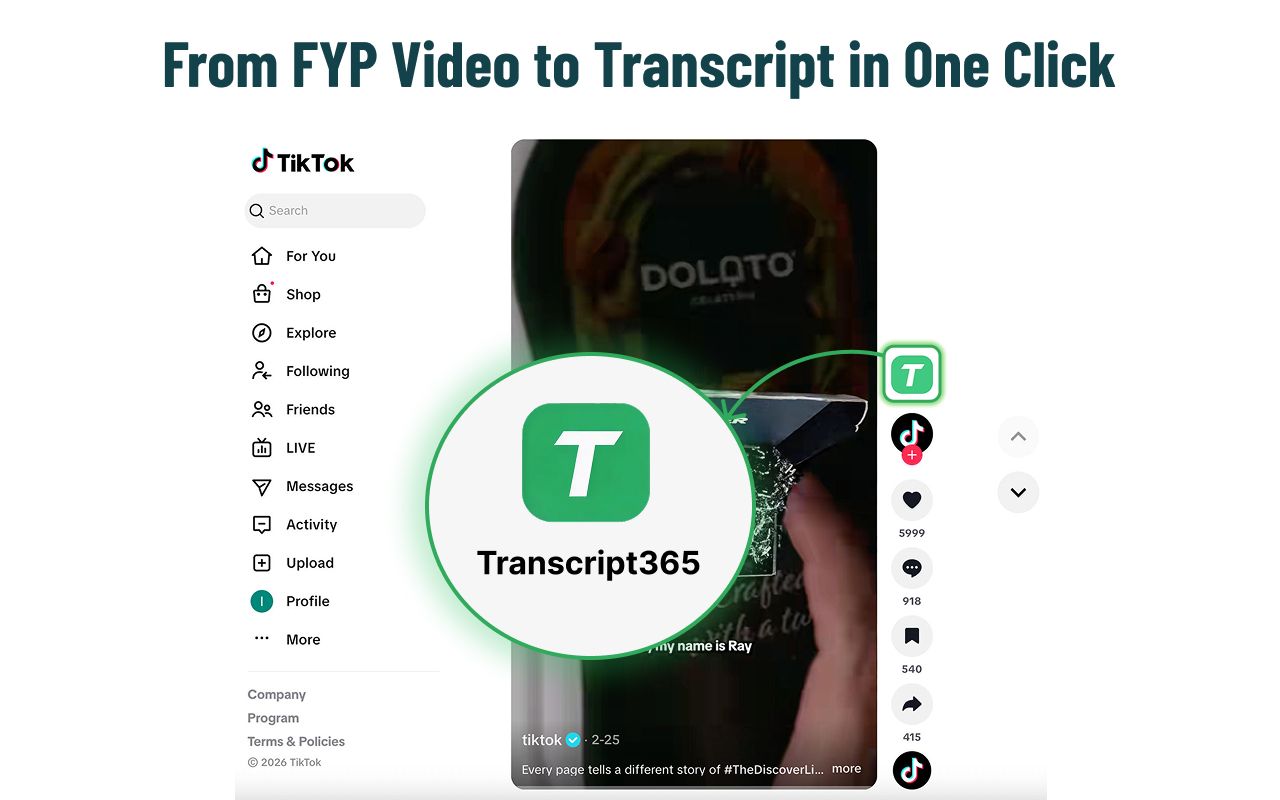
- Install the Transcript365 Chrome Extension from the Chrome Web Store:
Transcript365 Chrome Extension - Open any TikTok video page in your browser.
- Click the Transcript365 icon in the browser toolbar to trigger AI Transcription with one click.
- Wait 3–10 seconds for the system to complete AI Transcription.
- Once done, you can:
- Read the full transcript directly on the page
- Copy and paste into your notes or documents
- Export as Text, SRT, or WebVTT for subtitles or archiving
Option B: Web App Dashboard — Best for Bulk Management and Archiving
Best for: Users who need to manage a large number of TikTok transcripts in one place, such as for research projects or team workflows.
How it works:
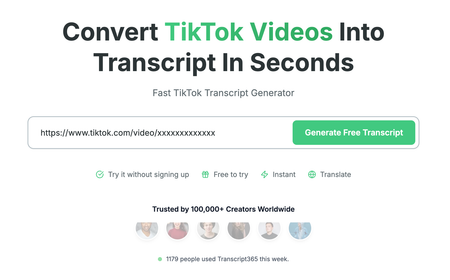
- Open the Transcript365 website:
Transcript365 TikTok Transcript Tool - Copy the TikTok video link and paste the URL into the input box.
- Select the language (Transcript365 supports 100+ languages, or you can use auto‑detect).
- Click Generate to start AI Transcription.
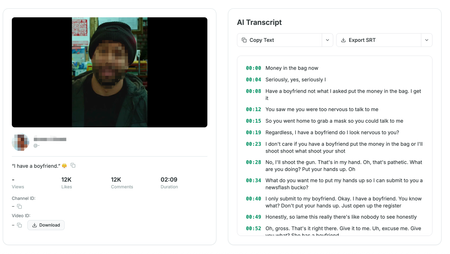
- In the unified dashboard, you can:
- View all your past AI Transcription records
- Add tags or notes to different videos
- Export TXT, SRT, or WebVTT files as needed
Why Can Transcript365 Offer TikTok AI Transcription Completely Free?
Most traditional transcription tools charge per minute because:
- Long audio and video are expensive to process
- They’re not optimized for short‑form video workflows
Transcript365 takes a different approach:
- On the tech side: It’s optimized for social short‑video AI Transcription, so each clip can be processed in 3–10 seconds, which keeps marginal cost per video very low.
- On the product side:
- TikTok is treated as a “core free benefit” — TikTok AI Transcription is completely free and does not consume credits, designed to support creators and power users.
- For other platforms like Instagram, YouTube, Facebook, X (Twitter), and Xiaohongshu, Transcript365 uses a per‑video credit model, so you can pay as you go.
- Enterprise and team users can access bulk processing, API integration, and other advanced features, which is where the platform monetizes.
Credits and expiration — how it really works:
- Transcript365 automatically gifts 5 free credits every week for non‑TikTok videos.
- Paid credits have an initial validity of 1 year, but if they ever expire, buying any new package instantly reactivates and restores all expired credits.
- In practice, this means your paid credits never truly expire as long as you eventually make another purchase.
Method 2: TikTok Built‑In Captions (Free but Very Limited)
The TikTok app has its own auto‑caption feature, and some videos show captions directly on the playback screen.
Pros:
- Completely free
- No extra tools required
But in real‑world use, there are clear limitations:
- Not all videos have captions: It depends on creator settings and TikTok’s own recognition.
- Unstable accuracy: Errors increase with loud background music, multiple speakers, dialects, and slang.
- No text export: You can only see captions on screen; you can’t copy or download them as TXT/SRT.
- No standard time‑coded files: You don’t get SRT or WebVTT with timestamps for professional editing or subtitling.
If you just want a rough idea of what’s being said, TikTok’s captions are fine. But if you need to:
- Systematically organize content
- Use it in reports, papers, or formal citations
- Generate editable subtitle files
Then a dedicated AI Transcription tool like Transcript365 is far more suitable.
Method 3: Manual Transcription (Old‑School and Very Time‑Consuming)
Manual transcription means:
- Playing the TikTok video
- Constantly pausing and rewinding
- Typing everything you hear yourself
Main issues:
- Extremely inefficient: A 1‑minute video can easily take 10+ minutes to transcribe.
- Error‑prone: Repeated listening and typing is mentally exhausting, so mishearing and typos are common.
- Not scalable: If you have dozens or hundreds of TikToks, manual transcription is practically impossible.
In 2026, with mature AI Transcription, manual transcription should only be a last‑resort backup for very special cases.
Method 4: Other Third‑Party Transcription Tools (Paid and Heavy Workflow)
There are many general‑purpose transcription services that can technically handle TikTok videos, but most are not designed for short‑video use.
Common pain points:
- You must download the TikTok video locally, then upload it to the service
- Pricing is per minute, which makes short clips relatively expensive
- Many tools don’t support direct TikTok URLs
Examples:
- Otter.ai: Focused on meetings and live calls, mainly supports English, and doesn’t natively accept TikTok links.
- HappyScribe: Charges per minute with no generous free tier; you have to upload audio/video files.
- Rev: AI transcription is around $0.25 per minute and often has minimum charges.
- Transcript24, Getthescript, Dokiscript, etc.: Some support URL‑based transcription, but in terms of accuracy, language coverage, and pricing, they’re generally less optimized for short‑video workflows. Transcription always consumes credits, with typical per‑video costs above $0.02.
If your main use case is frequent TikTok short‑video AI Transcription, these services are usually too heavy and too expensive. They’re better suited to long meetings, podcasts, or formal interviews.
How to Get Higher‑Quality TikTok AI Transcription
No matter which tool you use, the following practices will noticeably improve your results:
Manually set the language when possible
Transcript365 supports automatic language detection, but for less common languages or mixed‑language videos, it’s better to manually select the main language before AI Transcription. This can significantly boost accuracy.Control background music and noise
If you’re the creator, try to avoid:- Overly loud background music
- Strong environmental noise
- Music and speech at similar volume levels
All of these make AI Transcription harder.
Double‑check proper nouns and numbers
AI can occasionally misrecognize:- Names of people, places, and brands
- Technical terms
- Numbers (money, dates, times, percentages)
After AI Transcription, spend 30 seconds scanning the transcript and focus on verifying these key items.
Use SRT/WebVTT exports wisely
If you need to:- Pinpoint exact sentences in an editor
- Add multilingual subtitles to your video
- Cite specific time‑coded segments in a report
Export SRT or WebVTT directly. Both formats include timestamps, which makes precise navigation and editing much easier.
FAQ
Q: Is TikTok AI Transcription on Transcript365 really completely free?
A: Yes. For TikTok, Transcript365 offers completely free AI Transcription, and no credits are consumed for TikTok videos. The current TikTok‑specific free policy is valid through December 31, 2026.
Q: What formats can I download my transcripts in?
A: After AI Transcription in Transcript365, you can export:
- Plain text TXT
- Subtitle file SRT
- Subtitle file WebVTT
In some cases, you can also export DOCX for further editing in word processors.
Q: Is it legal to transcribe TikTok videos to text?
A: In many jurisdictions, using AI Transcription on public videos for learning, research, commentary, news reporting, or personal organization is generally considered fair use or similar. However, you should:
- Respect the original creator’s copyright and attribution
- Avoid using other people’s content commercially or passing it off as your own
- Seek permission from the creator if you plan large‑scale or commercial use
Q: Do Transcript365 credits ever expire?
A: Practically speaking, you can treat them as never expiring:
- Credits initially have a 1‑year validity
- If they expire unused, any future purchase of any package (starting from just $4.9) will instantly reactivate and restore all expired credits
So as long as you plan to use the service again at some point, your credits’ value is preserved.
Q: If I only use TikTok AI Transcription, do I ever need to buy credits?
A: If you only AI Transcribe TikTok videos and don’t touch other platforms (YouTube, Instagram, Xiaohongshu, etc.), you can keep using Transcript365 for free under the current policy. You only need credits when you want AI Transcription for non‑TikTok platforms.
Summary
In 2026, turning TikTok videos into text is no longer expensive or complicated. With Transcript365 AI Transcription, which is purpose‑built for social short‑video:
- You can convert any TikTok video into editable, searchable text in 3–10 seconds
- You benefit from TikTok‑specific AI Transcription that’s completely free and uses zero credits
- You can integrate the Chrome Extension one‑click workflow directly into your normal TikTok browsing
Whether you’re a creator, researcher, journalist, student, or simply someone who wants to capture and reuse TikTok knowledge more efficiently, Transcript365 is a strong tool to add to your daily stack.
Start now:
- Install the Transcript365 Chrome Extension:
Transcript365 Chrome Extension - Open any TikTok video and trigger AI Transcription with one click.
- Enjoy 0‑credit, completely free TikTok AI Transcription through the end of 2026, and turn short videos into reusable text assets.
Learn more on the Transcript365 website:
Transcript365 TikTok Transcript Tool
Last updated: April 2026
Article slug: free-tiktok-video-to-text-guide